
Fusion Pharma Analytics
Case Study
About
FusionPharma, a life sciences firm, required a modern data ingestion and validation pipeline to handle heterogeneous healthcare data—ranging from clinical trial CSVs, patient-reported outcomes (JSON), EHRs (XML), and lab results (fixed-width). The objective was to build a scalable, fault-tolerant Azure Data Factory solution that harmonizes multi-format data into curated, analytics-ready zones.
The Challenge
Managing diverse, high-volume healthcare data required robust orchestration, validation, and flexibility across formats and arrival patterns.
-
Multiple file formats: CSV, JSON, XML, and fixed-width needed custom handling
-
Files arrive asynchronously, requiring independent ingestion logic
-
Varying data quality mandated validation and quarantine mechanisms
-
Manual processes increased turnaround time and error rates
-
Lack of centralized orchestration complicated monitoring and maintenance
Solution
A modular, parameterized Azure Data Factory architecture was implemented to streamline ingestion and validation across sources.
-
Created independent pipelines per source, each with a dedicated Mapping Data Flow
-
Designed reusable datasets with schema drift and parameter support
-
Applied validation logic using Assert and Conditional Split in data flows
-
Directed clean data to curated zones and invalid rows to quarantine
-
Built an optional parent pipeline for unified control and monitoring
-
Integrated event and schedule triggers for source-specific execution
Impact
Reduced ingestion time and eliminated manual validation steps. Enabled asynchronous, schema-aware ingestion with automatic error handling and data quarantine. Provided a scalable foundation for regulatory reporting and downstream analytics, with high observability and fault isolation across the pipeline ecosystem.

Data Flows
Mapping Data Flows in Azure Data Factory enable visual, code-free transformation of complex healthcare data. Each source type - CSV, JSON, XML, fixed-width - is processed through a dedicated Data Flow that handles schema drift, validation, and transformation. Common steps include Derived Column for standardization, Assert for data quality rules, and Conditional Split for routing valid and invalid records. This modular approach improves maintainability and reusability. By isolating transformation logic from orchestration, Data Flows provide a scalable and transparent mechanism to prepare data for curated zones and support error-tolerant ingestion.

Unrolling JSON Structures
Flattening and unrolling JSON is essential when dealing with nested healthcare data like patient-reported outcomes. Using Azure Data Factory’s Mapping Data Flows, hierarchical JSON structures are transformed into tabular formats by applying the Flatten transformation. Arrays within the JSON are “unrolled” into multiple rows, making each record analyzable in a relational structure. This process ensures that nested fields are extracted cleanly while preserving relationships across hierarchy levels. It enables seamless ingestion into curated zones and supports downstream analytics, reporting, and machine learning workflows.

Data Validation and Assert
Data validation in Azure Data Factory ensures the integrity of healthcare data during ingestion. Using Assert transformations in Mapping Data Flows, custom rules are applied to enforce quality—such as checking for nulls in key fields, validating date formats, detecting out-of-range values, and ensuring consistency across related fields. These rules help catch anomalies early in the pipeline. By defining validations declaratively within each data flow, the process remains transparent, repeatable, and easy to maintain, enabling reliable transformation of raw source files into trusted datasets for analytics and reporting.

Curated & Quarantine
The Quarantine and Curated process ensures data quality and trust in downstream analytics. During ingestion, each record passes through validation checks using ADF Data Flow’s Assert and Conditional Split transformations. Valid records are routed to the Curated Zone, where they are harmonized, standardized, and made analytics-ready. Invalid or incomplete records are redirected to the Quarantine Zone, preserving them for review without interrupting the pipeline. This design isolates bad data, supports compliance, and enables faster issue resolution. The separation also improves pipeline resilience, allowing partial success and reducing reprocessing efforts when only subsets of data fail validation.
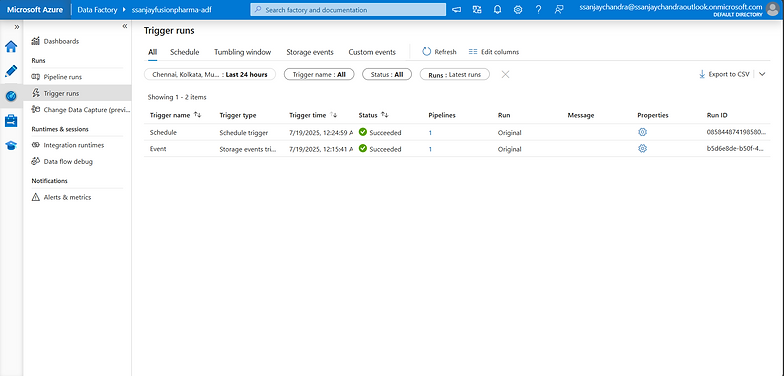
Triggers
Triggers in Azure Data Factory automate pipeline execution based on time or events, ensuring timely and reliable data ingestion. In the FusionPharma project, Schedule Triggers were used to run nightly batch pipelines for sources like clinical and lab data, while Event Triggers were configured to respond instantly to file drops, such as for critical patient-reported outcomes. This combination of triggers allowed asynchronous and on-demand processing, aligned with each source's delivery pattern. Triggers ensured minimal manual intervention, improved operational efficiency, and maintained data freshness across the ingestion pipelines